

Notice
Recent Posts
Recent Comments
Link
| 일 | 월 | 화 | 수 | 목 | 금 | 토 |
|---|---|---|---|---|---|---|
| 1 | 2 | 3 | 4 | 5 | 6 | |
| 7 | 8 | 9 | 10 | 11 | 12 | 13 |
| 14 | 15 | 16 | 17 | 18 | 19 | 20 |
| 21 | 22 | 23 | 24 | 25 | 26 | 27 |
| 28 | 29 | 30 |
Tags
- 정보를 담을 수 있는 그릇
- 클로드
- 컨텍스트 엔지니어링
- 입출력
- 리스트와 차이점
- 그룹 # 그룹 해체 # 단축키 #figma #Figma
- 변할 수 있는
- 바이브코딩
- 조지 불
- 파이썬
- Python
- Napkin AI
- 모수적 학습
- 비모수적 학습
- opentelemetry
- Java Script # == # === # difference # 차이
- langchain
- Ollama
- 귀도 반 로섬
- html
- 자율성 슬라이더
- 변수
- a=1
- graphrag
- 변수와 입출력
- null # undefined
- 성적 입력받기
- 조건문 큰 수부터 입력받아야하는 이유
- del()
- Dynamic GraphRAG
Archives
- Today
- Total
I about me
AI 에이전트 실습 본문
사용자를 대신하여 지능적으로 작업을 수행하는 시스템

1. openai key 발급
https://platform.openai.com/login?next=%2Fsettings%2Forganization%2Fbilling%2Foverview
2. .env파일에 아래와 같이 넣을 것
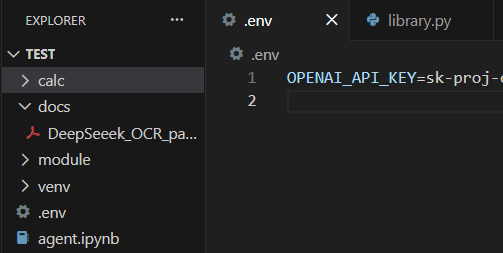
OPENAI_API_KEY=sk-proj-...
3. 키 설정
import os
from dotenv import load_dotenv

load_dotenv()

# print(os.getenv("OPENAI_API_KEY"))
4. 나의 vector store 만들기!
vector store란, 내가 A를 말하는데 그 A에 대해 말하기 위한 방을 만들어주는 거임!
from openai import OpenAI

client = OpenAI()

vector_store = client.vector_stores.create(
    name = "..." # deepseek 논문을 바탕으로 할 것이다.
)

print(f"Vector store 생성 완료")
print(f"ID {vector_store.id}")
print(f"Name {vector_store.name}")
print(f"Status {vector_store.status}")
5. 그 방 안에 지식을 넣어줄거임
pdf_path = "docs\ ... .pdf"

with open(pdf_path, "rb") as f:
    file_upload = client.files.create(
        file=f,
        purpose="assistants" # "assistants": 지식 기반, "fine-tuning": 미세조정
    )

print("파일 업로드 완료!")
print(f"ID {file_upload.id}")
print(f"Filename {file_upload.filename}")
print(f"Size {file_upload.bytes} bytes")
6. 지식 넣어진 방에서 단일 rag 에이전트 구축
from agents import Agent, FileSearchTool, Runner, trace

rag_agent = Agent(
    name = "RAG Expert", # RAG 전문가
    instructions = """You are a helpful assistant that answers questions based on the documents in the vector store.""",
    tools = [
        FileSearchTool(
            vector_store_ids = [vector_store.id],
            max_num_results = 5, # 상위 5개
            include_search_results = True
        )
    ]
)

print(f"Agent 생성 완료")
print(f"Name: {rag_agent.name}")
print(f"Tools: {[tool.name for tool in rag_agent.tools]}")
7. 질문 및 답변 테스트
async def ask_rag_agent(question: str): # 비동기: 여러 질문을 한 번에 처리할 수 있도록 함
    """RAG 에이전트에게 질문하기"""
    with trace("RAG Query"): # trace: 에이전트의 행동을 추적하여 디버깅과 분석에 도움을 줌. 즉 "RAG Query"라는 이름으로 추적 시작
        result = await Runner.run(rag_agent, question) # await rag_agent.run(question)
        return result

# 첫 번째 질문하기
question1 = "Deepseek이 뭐야? 2문장 이내로 설명해봐"

print(f"질문: {question1}")
print("=" * 50)

result1 = await ask_rag_agent(question1) # await: 할 때까지 기다리겠다는 의미, if not -> 나중에 처리할 작업으로 넘김
print(f"답변: {result1}")
8. 멀티 에이전트 구축 방법
8-1. 'handoff_description = '를 사용하여 어떨때 무엇을 해라!를 만들자!
from agents import Agent, FileSearchTool, Runner, trace

# 1. RAG 전문가 에이전트를 만들고 싶다면?
rag_specialist = Agent(
    name="RAG Specialist",
    handoff_description="Deepseek 논문에 대한 질문을 처리하는 전문가, 논문 내용, 기술적 세부사항, 벤치마크 결과 등 질문에 답변합니다.",
    instructions="""You are a RAG specialist agent focused on answering questions about the Deepseek OCR paper.

    Your role:
    - Search the vector store for relevant information.
    - Ptovide accurate, document-based answers
    - Include specific details, numbers, and quotes when available.
    - Answer in Korean
    """,

    tools = [
        FileSearchTool(
            vector_store_ids = [vector_store.id],
            max_num_results = 5, # 상위 5개
            include_search_results = True
        )
    ]
)

# 2. 일반 어시스턴트 에이전트를 만들고 싶다면?
general_assistant = Agent(
    name="General Assistant",
    handoff_description="일반적인 질문이나 인사, 잡담 등을 처리하는 어시스턴트, 문서와 관련없는 일반적인 대화를 담당합니다.",
    instructions="""You are a friendly general assistant.

    Your role:
    - Handle greetings and casual conversations
    - Answer general knowledge questions
    - Provide helpful responses for non-document queries
    - Be friendly and conversational
    - Answer in Korean
    """,

    tools = [
        FileSearchTool(
            vector_store_ids = [vector_store.id],
            max_num_results = 5, # 상위 5개
            include_search_results = True
        )
    ]
)

# 3. 요약 전문가 에이전트를 만들고 싶다면?
summarizer = Agent(
    name="Summarizer",
    handoff_description="논문의 전체 요약이나 특정 섹션 요약을 요청할 때 사용하는 요약 전문가",
    instructions="""You are a summarization expert for the DeepSeek OCR paper.

    Your role:
    - Search the document and create comprehensive summaries
    - Provide structured summaries with key points
    - Highlight important findings and contributions
    - Use bullet points for clarity
    - Answer in Korean
    """,

    tools = [
        FileSearchTool(
            vector_store_ids = [vector_store.id],
            max_num_results = 10, # 요약을 위해 더 많은 결과
            include_search_results = True
        )
    ]
)
8-2. 합쳐서 비빔밥을 만들어라
triage_agent = Agent(
    name="Triage Agent",
    instructions="""You are a triage agent that routes user questions to the appropriate specialist.

    Routing rules:
    1. ** RAG Specialist **: Questions about the DeepSeek OCR paper conten , technical details, methodology, experiments, or results
    2. ** Summarizer **: Requests for summaries, overviews, or key takeaways
    From the paper
    3. ** General Assistant **: Greetings, general questions, or anything not related to the document

    Always analyze the user's intent carefully before routing.
    Do NOT answer questions directly - always hand off to the appropriate specialist.
    """,
    handoffs=[rag_specialist, summarizer, general_assistant]
)

print(f"Trigger Agent 생성 완료!")
print(f"handsoffs: {[agent.name for agent in triage_agent.handoffs]}")
9. 멀티 에이전트 실행
async def ask_triage_agent(question: str):
    """트리아지 에이전트에게 질문하기"""
    with trace("Multi-Agent RAG"):
        result = await Runner.run(triage_agent, question)
        return result


# 테스트 1: 일반 인사 (-> General Assistant)
test1 = "안녕하세요. 오늘 기분이 어때요?"

print(f"질문: {test1}")
print("=" * 50)

result = await ask_triage_agent(test1)
print(f"답변: {result.final_output}")
print(f"최종 에이전트: {result.last_agent.name}")
질문: 안녕하세요. 오늘 기분이 어때요?
답변: 안녕하세요! 저는 항상 기분이 좋아요. 오늘도 여러분을 도와드릴 준비가 되어 있습니다. 😊 혹시 궁금한 점이나 필요한 게 있으시면 언제든 말씀해 주세요!
최종 에이전트: General Assistant
이제 완전 openai쪽에서도 미니미 n8n이 가능하네... Agent Builder 기능 미쳤네...ㄷㄷ
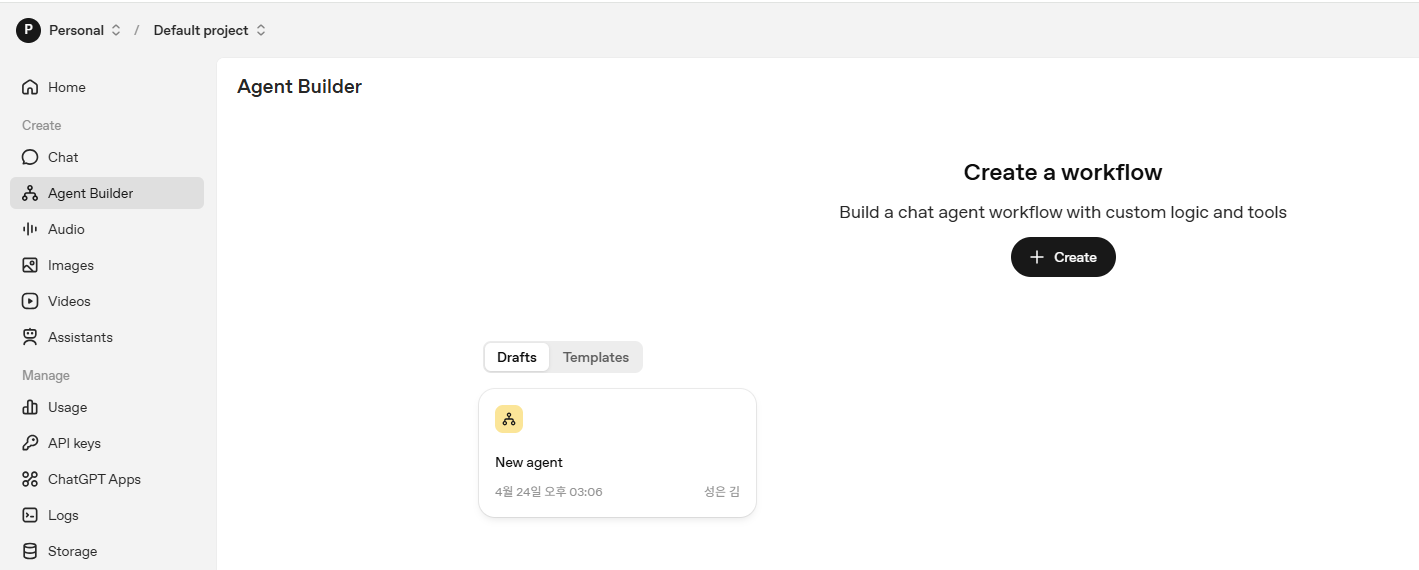
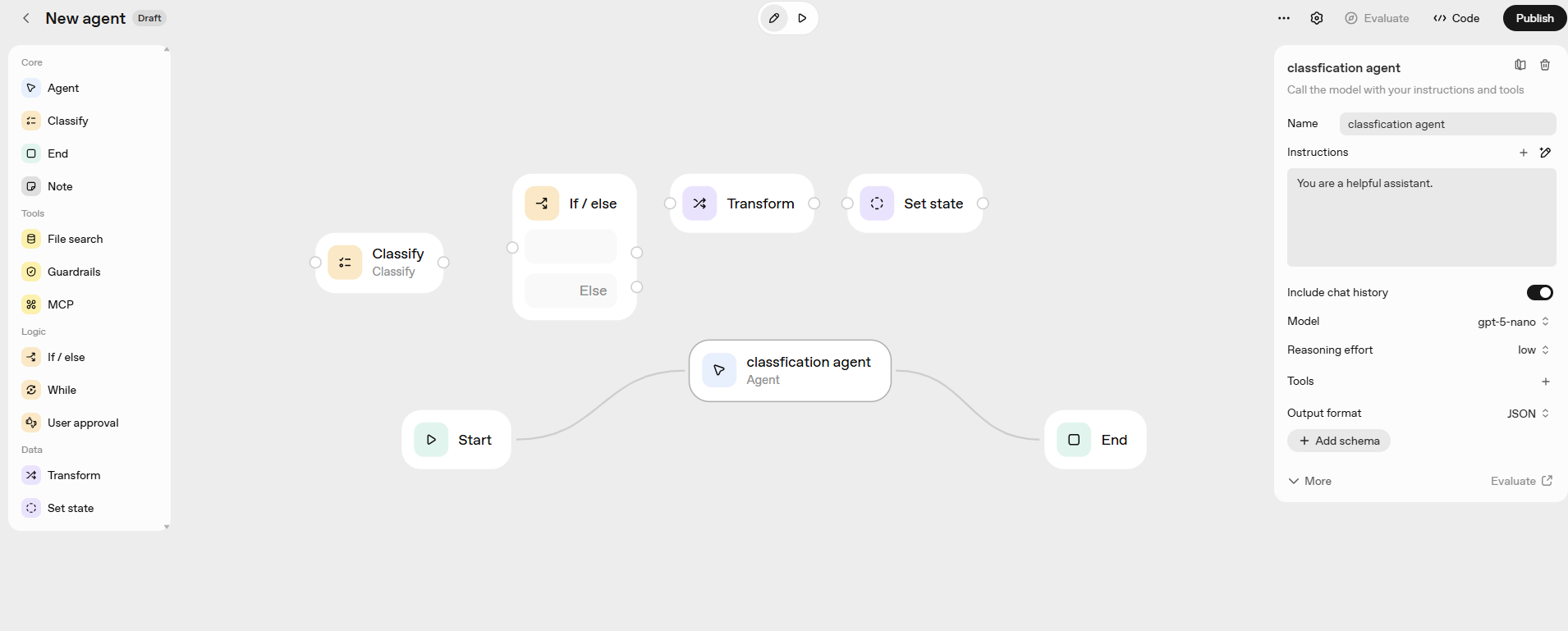
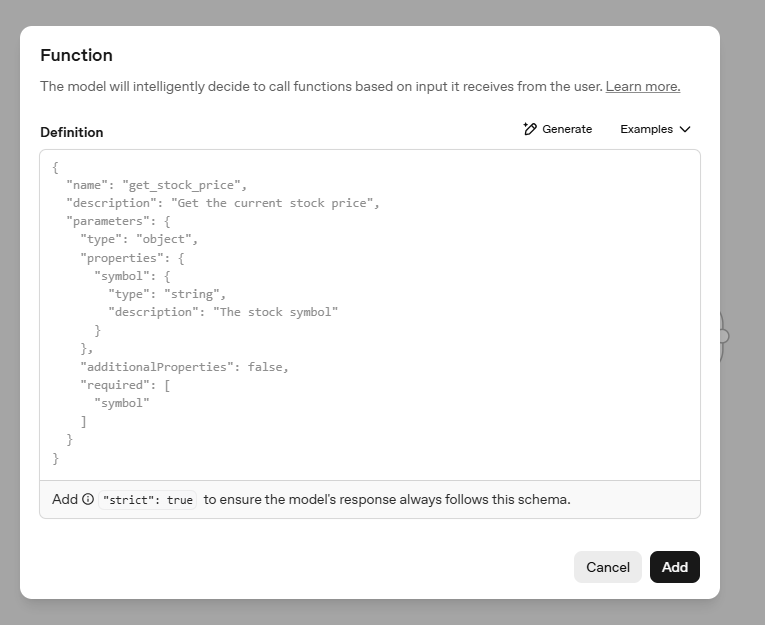
그리고 여기 tools 누르고, Function 누르면 곧바로 이 output 형태가 나온다... 와...

'AI > AX' 카테고리의 다른 글
| multi-agent 아키텍처의 종류 (0) | 2026.05.06 |
|---|---|
| AWS 입문 (0) | 2026.04.28 |
| n8n docker에 설치하는 방법 (0) | 2026.04.09 |
| AI로 배우는 단계별 기획서 작성법 (0) | 2026.03.19 |
| 바이브코딩 (0) | 2026.01.08 |